

What can an AI email assistant do in Atlas?
Three things, all with Gmail. It reads the mail you allow. It drafts replies. And it turns mail into tasks, or into calendar events with your OK. You choose what to connect, and you can disconnect Gmail at any time in Settings.
Reading and drafting reach no one else. Sending is different, and Atlas treats it differently. That is the reason for the approval card below.
Two more protections sit around the mail itself. Before any text goes to an AI model, Atlas Shield swaps cards, bank numbers, SSNs, passwords, keys and codes for stand-ins (the Standard level, which is the default). The Private level also hides email addresses, phone numbers and street addresses. Shield hides the shapes it recognises, so an unusual format can slip through, and it cannot look inside pictures. And if Atlas picks up a fact from an email, such as a preference, it waits for your OK before it counts. Passwords and card numbers are never kept.
How does it work, step by step?
- Connect. In Settings, connect Gmail and choose what Atlas may read.
- Describe the job. For example: every morning at 8, read new mail and turn anything that needs me into a task. Atlas asks only what it cannot guess.
- Try it. Atlas runs the job on last week's mail first. Nothing runs for real until you turn it on.
- Review drafts. A reply arrives as a draft for you to read. You can Edit it, send it or choose Not now.
- Approve what leaves. Email to anyone else asks first. The card says what will be sent and to whom.
- Check receipts. Activity lists what Atlas did and what you approved.
What does the approval card show?
The card says what will change or be sent, to whom, in the words it will use. The buttons are Approve (or Send), Edit and Not now. If you do not answer, the card closes after 10 minutes with nothing sent. If a check cannot be made, the step does not run.
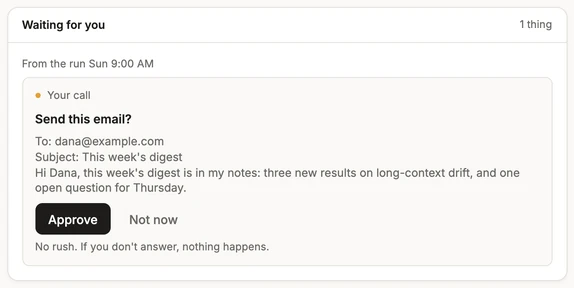
A yes is signed by the server, and the tool that would send refuses without the signature. No agent can raise its own level or approve for you. This is enforced in code, not just written into a prompt, so a clever message cannot talk an agent past it. The reasoning is in why your AI email assistant should ask before it sends.
Here is how it looks in practice. Dana emails to ask for a revised quote. Atlas drafts a reply and shows you a card: what will be sent, to Dana, in the words it will use. You change one line with Edit and press Send. Activity then shows that you approved it. If you had chosen Not now, nothing would have been sent.
What needs you arrives in Notifications and on your phone, and quiet hours are respected. So a card waiting for your yes does not have to wake you up.
What are some example email jobs?
- Morning sort. Every day at 8, read new mail and turn anything that asks something of you into a task. Tasks from agents are marked, so you know where they came from.
- Invoice chase. Every Friday, draft a short reminder to each person who has not paid. You read each card, then approve, edit or skip it.
- Event from an email. Turn an email about a time and place into a calendar event, with your OK.
- Reply drafts. Ask Atlas to draft a reply in Chat. It shows you the draft and waits for your OK before it sends.
- Weekly check. An agent reads what arrived this week and tells you what is still waiting for an answer.
- Meeting follow-up. After a meeting, turn your notes into tasks, and draft one thank-you note for you to approve.
What does Atlas never do with your mail on its own?
It never sends email to anyone else without your yes, unless you gave a standing yes for that job. It never sends an invite with guests without asking. It never pays or buys for you, and it never deletes anything for good. Deleted items stay in Trash for 30 days. A sent email cannot be unsent, which is why sending asks first.
What is a standing yes for email?
A standing yes is a permission for one named job. It lists what the agent may do, who it may reach and how many a day, and it lasts until it ends or you take it back. Giving more asks for your code. Taking it back never does. The server checks it again before every use, every use leaves a receipt, and sends under a standing yes show in amber.
Start with a low daily number and one named job. The Trust page has the exact rules. Atlas is in private beta, and you can join the beta. To see how agents are built, read how agents work.