How to keep private data from AI: how Atlas Shield works
To help with real work, an AI model has to read real text, and real text is full of private details. How Atlas Shield swaps them for stand-ins first, what it hides, and what it cannot.
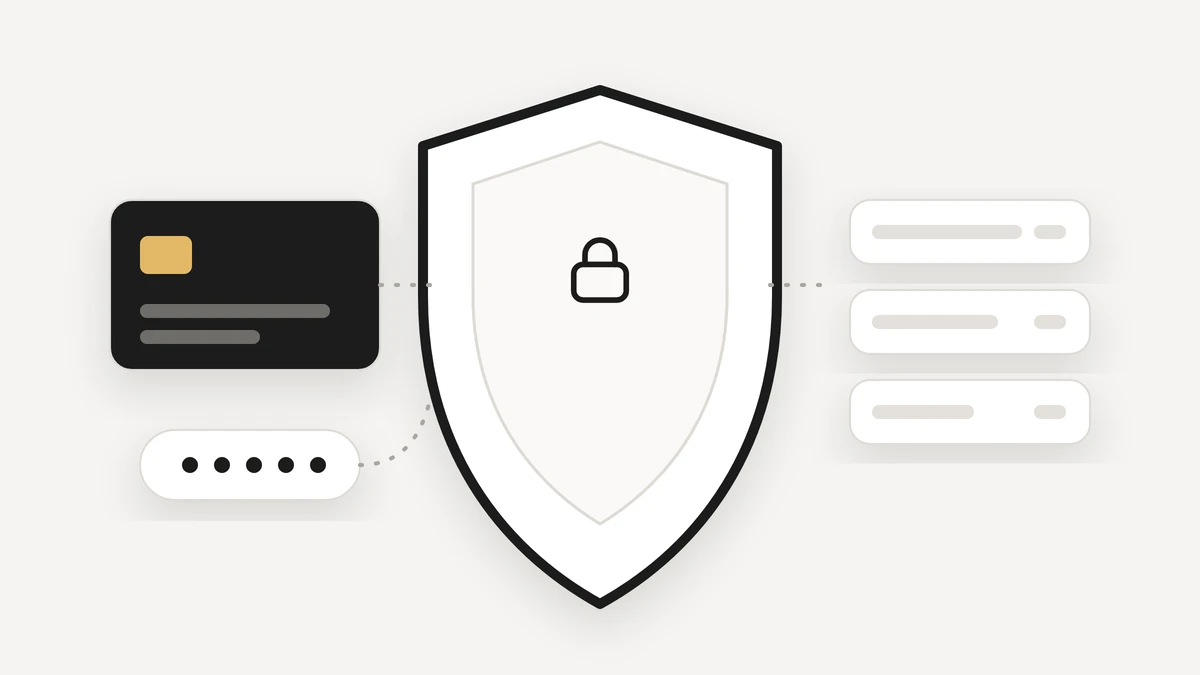
If you want to keep private data from AI, the safest place to act is before the text leaves your hands. To help with real work, an AI model has to read real text, and real text is full of things you would rather it never saw: card numbers, bank details, passwords, a phone number in an email. Atlas Shield sits between your words and the model, so the model works with stand-ins instead. This post explains what that means, what it hides and what it cannot.
Why does private data end up in AI tools?
Because it is in the work. A message to a friend about paying them back includes a card number. An email you ask an assistant to summarise includes a phone number and an address. A note you ask it to tidy includes a password you pasted weeks ago. Nobody sets out to share secrets with an AI. They are inside the text the AI is asked to read.
That is why advice such as just do not paste anything private only goes so far. It relies on you spotting every detail every time. A better design hides the details automatically, and that is what Atlas Shield is for.
What counts as private data?
In privacy work this is often called personally identifiable information, or PII. The NIST guide to protecting the confidentiality of PII is a clear neutral explanation of the idea. In practice it covers two groups:
- Secrets. Card numbers, bank numbers, SSNs, passwords, keys and codes.
- Details about people. Email addresses, phone numbers, street addresses, and names and companies.
Atlas treats the first group as the hidden basics and lets you choose how much of the second group to hide.
There is a second reason to hide details early. Once a detail has gone into a prompt, you cannot take it back. Cleaning up afterwards means trusting every system the text passed through. Hiding the detail first means the text that leaves your workspace never contained it in the first place. That is a simpler promise to keep, and a simpler one to check.
How does Atlas Shield keep private data from AI?
Before any text goes to an AI model, Shield swaps the private details for stand-ins. When you write Pay Sam back, card 4111 1111 1111 1111, the model receives Pay Sam back, card [CARD_1]. It can still do the job, because it only needed to know that a card was involved.
- Hidden before it leaves. The swap happens before any text reaches the model.
- Real values stay with you. The model only ever works with stand-ins. Atlas rebuilds the swap for each step and never stores it.
- Swapped back only for you. What you read, and what you approve, shows the real values. A card or password is never written back into a link, and Atlas never saves one, even when you approve.
Which Shield level should you choose?
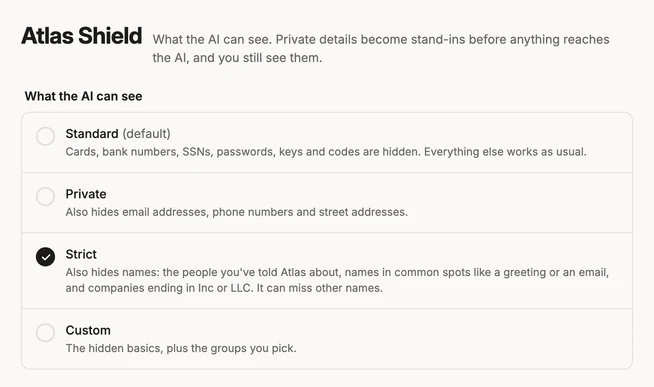
- Standard (the default) hides cards, bank numbers, SSNs, passwords, keys and codes.
- Private also hides email addresses, phone numbers and street addresses.
- Strict also hides names and companies it can recognise, such as people you have told Atlas about. It can miss other names.
- Custom is the hidden basics, plus the groups you pick.
If most of your work is your own notes and plans, Standard is a sensible start. If you work with other people's details, such as clients or students, Private or Strict is a better fit. You can change the level in settings, and the Trust page lists exactly what each level covers.
Can you mask personal data before using ChatGPT?
You can, if you do it yourself. Replace the card number, the name or the address with a placeholder before you paste, and put the real value back afterwards. It works, but it relies on remembering every time, and on spotting every detail. Also look at the data settings of any chat assistant you use: most have a control for whether your conversations can be used to improve their models.
The advantage of building the swap into the workspace is that it happens every time, on every step, without you thinking about it. That is the idea behind PII redaction for AI, and it is how Shield works inside Atlas.
What can Atlas Shield not do?
Shield hides the shapes it recognises, so an unusual format can slip through. It cannot look inside pictures, which is why there is a switch to keep pictures from the AI entirely. And at the Strict level it can miss names it does not recognise. We would rather tell you the limits than pretend there are none.
Shield is one part of how Atlas keeps you in control. The other is approvals: anything that reaches other people asks first. Read why your AI email assistant should ask before it sends, or see how it fits together in what an AI workspace is. Atlas is free during the private beta, and you can join the beta.
Questions
How do I keep private data from AI?
Do not paste secrets into tools that do not protect them, and use a product that swaps private details for stand-ins before any text reaches the AI. Atlas Shield does this for cards, bank numbers, passwords, keys and, at higher levels, contact details and names.
Can I mask personal data before using ChatGPT?
You can, by removing or replacing it yourself before you paste. Doing it by hand is easy to forget, which is why a tool that swaps the details for you is safer. Also check the data settings of any chat assistant you use.
What is PII redaction for AI?
PII means personally identifiable information, such as names, addresses, phone numbers and card numbers. Redaction hides it before the text is processed. Atlas Shield swaps it for stand-ins and puts the real values back only for you.
Can Atlas Shield miss something?
Yes. Shield hides the shapes it recognises, so an unusual format can slip through, and it cannot look inside pictures. You can keep pictures from the AI entirely.